

Beyond delivering relevant search results (obviously), a WordPress search plugin must also have several other qualities to be considered suitable. Chief among them is speed.
Time and time again, studies have shown that a fast website leads to better engagement and higher conversions. On-site search should be fast for the same reasons: to retain customers and drive sales. In the WordPress ecosystem, there are a multitude of WordPress search plugins, each with its own strengths and weaknesses. In this article, we aim to conduct a search performance benchmark focused on the speed of some of the most popular WP search plugins. But before we begin, let’s look at the factors that affect speed.
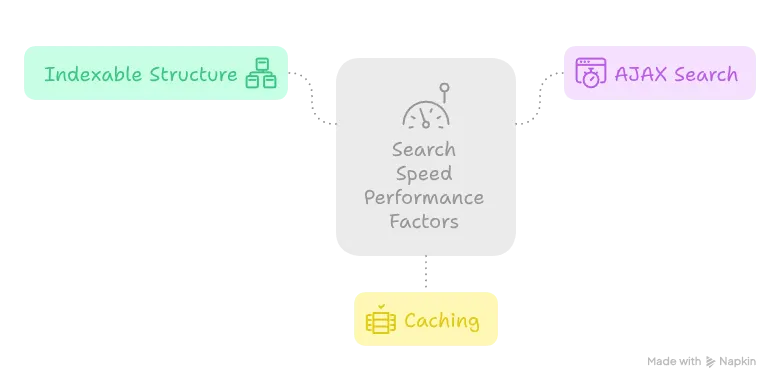
What are search performance factors?
Let’s review them. Some are obvious, while others need more explanation:
- Quality of code
- Index location and structure
- AJAX search
- Caching
Indexable Structure
Before content can be searched — whether it’s a post, page, or custom type — it must be processed to speed up future searches. The results of this processing are saved on disk and are called indexes. The index structure and its storage location are among the most important performance factors for search performance.
Common storage options include on-site databases, off-site databases, or local files.
- On-site databases are the most common, as they’re always available. This means the indexes are stored in the same database as WordPress.
- File-based storage is more complex. File access is generally slower, and shared hosting environments impose strict limitations, such as read/write speed caps and IOPS limits. These issues are typically mitigated to some extent by caching (discussed below).
- Off-site databases reside outside the WordPress server, usually on dedicated servers. These can include purpose-built search databases such as Elasticsearch or Solr. While these solutions add complexity to website maintenance, they offer the highest speeds — albeit at a higher cost. Hosted services are available to reduce management overhead. These solutions are ideal for high-traffic websites, those that require extremely fast searches or the ones that have a large amount of product/post/page.

AJAX Search
AJAX search enables users to search without reloading the page, which can have a complex effect on speed.
Often, the speed improvement is only perceived — meaning users feel the search is faster because the page doesn’t reload. (Check out this excellent article on perceived performance by Jeff Atwood, a prominent entrepreneur, CEO, and developer.) Still, perceived speed is just as important as actual speed.
In WordPress, the CMS load time is one of the most performance-heavy aspects. Some plugins optimize for this by using only the bare essentials during AJAX search. Others bypass WordPress entirely (which is possible when using off-site databases), effectively decoupling search functionality from WordPress itself.
Caching
When a user enters a search query, it’s matched against the index to find results. Caching allows parts of this process to be stored in memory and retrieved without accessing the index again.
What is measured and how?
We measure the time it takes to complete a search query.
- For plugins with AJAX search, we time the HTTP request.
- For plugins without AJAX search, we time the full page reload. To minimize the effect of WordPress page loading on the results, caching plugins are used.
Each test is repeated five times to calculate an average response time. Since users typically don’t search for the same thing repeatedly, and since search queries vary widely, using full response caching is not meaningful in our opinion. Therefore, we use a different query for each of the five repetitions.
Test environment
All experiments were conducted on a shared hosting environment with the following configuration. While this doesn’t represent all WordPress websites, it does reflect a large segment of them — especially those limited by shared hosting resources. Additionally, it can be argued that when the hosting is upgraded the same rankings would hold but the gap would decrease. While we were testing, no other traffic was present during on the website.
- RAM: 6 GB
- CPU: 4 cores
- IOPS limit: 1024
- I/O speed limit: 5 MB/s
- PHP memory_limit: 768 MB
The test site contains 50,000 dummy WooCommerce products with titles and descriptions.
What are the contenders?
- WordPress’s native search
- Ivory search
- Fibo search
- ElasticProbe
- AJAX search lite
- Relevanssi
Show me the results
Without further ado:
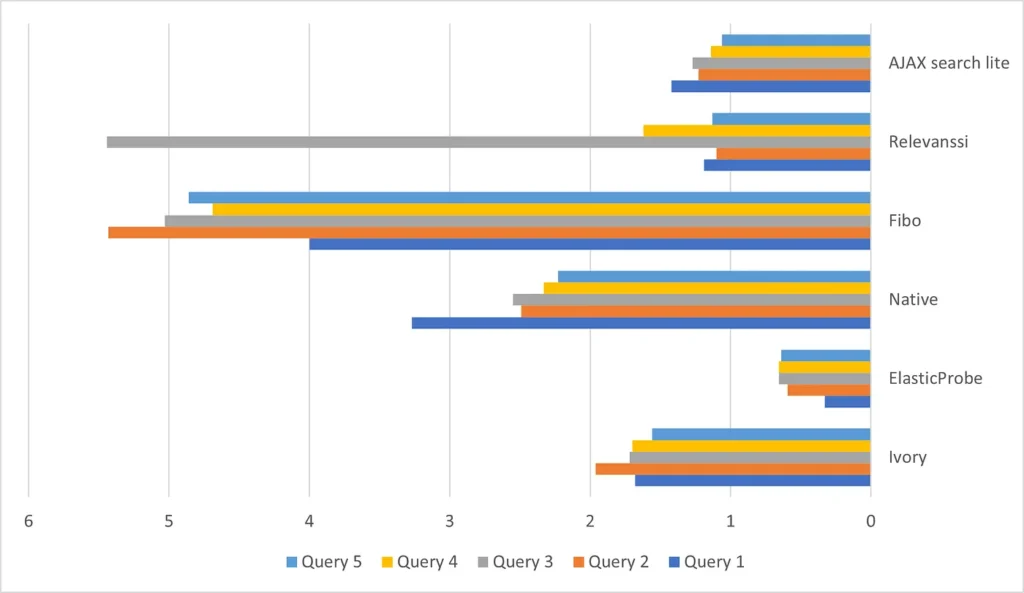
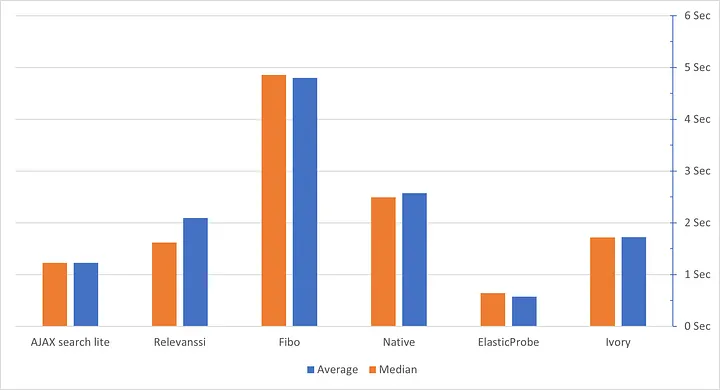
The second chart compares average and median response times. In statistics, when the average and median are equal, it indicates that data points are clustered around the average. When they differ, it suggests the presence of outliers. This is also evident in the first chart. These anomalies may be caused by shared hosting limitations or inherent quirks in the plugins. We can’t say for sure without further testing at scale.
Now, let’s focus on medians, which offer fairer comparisons by ignoring outliers.
- ElasticProbe is the only contender with a median response time under one second — 0.6 seconds.
- AJAX Search Lite and Ivory Search take 2nd and 3rd place with 1.2 and 1.7 seconds, respectively.
Final Thoughts
Performance, price, and result relevance form a triangle that must be balanced when choosing a WordPress search plugin. For example, anyone who has used the native WordPress search even once will agree that its result relevance is very low — which may make it worthwhile to install any alternative plugin.